

Published 25 September 2026
We only recommend products we think are worth it. Some links on this page are affiliate links: if you buy through one we earn a commission from Amazon, at no extra cost to you, and as an Amazon Associate we earn from qualifying purchases. It never changes which products we pick or how we rank them.
Short answer. Most of what makes a house workable with low vision costs under £15: bump dots on the dials you use by feel, a liquid level indicator for hot drinks, a proper handheld magnifier, a remote control with buttons you can find, and keyboard stickers you can read. Before spending anything, ask your council for a sensory services assessment, because a rehabilitation officer will visit free, and some of this equipment is handed out free too.
Get the free assessment first
Every council in Great Britain has a sensory team, sometimes called vision rehabilitation or sensory services. You do not need to be registered as sight impaired to ask for an assessment, and the rehabilitation officer who visits can supply items like liquid level indicators and bump-ons free, along with training on lighting, contrast and safe travel that no product replaces. The RNIB helpline can talk through what would help and how to get registered, which unlocks further support. If an ophthalmologist has mentioned a Certificate of Vision Impairment, follow it up; registration is the key that opens most doors.
Lighting matters more than any gadget. Stronger, well-placed task lighting is the first fix for reading and kitchen work, and our daylight lamps guide covers that separately.
The picks compared



As an Amazon Associate I earn from qualifying purchases. (paid link)
The picks in detail
A magnifier that lives in a pocket
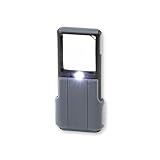
The Carson MiniBrite is the one to start with: a 5x lens with its own light, small enough to live where you need it. Buy one for the kitchen and one for the post. A word of honesty about the category: listings advertising 10x or 45x from a big flat lens overpromise, because high magnification from a cheap lens means distortion at the edges and a tiny sweet spot. Moderate power, good light and a steady hand beat a big number on the box. For long reading sessions, a bigger lens or an electronic magnifier is worth discussing with the sensory team before spending serious money.
| Photo | Title | Price | Buy |
|---|---|---|---|
|
| Carson MiniBrite 5x Pocket Magnifying Glass with LED Light and Sliding Case | Slide-Out Magnifier - Grey (PO-55) | £13.07 |
|
As an Amazon Associate I earn from qualifying purchases. (paid link)
A liquid level indicator for hot drinks
It hangs on the rim of the mug and beeps or vibrates as the liquid reaches it, which takes the scald risk out of making tea. The Aidapt one is loud and simple. Sensory services often supply these free, so ask before buying, and mention it if hearing is also reduced, because the vibrating type exists for exactly that.
| Photo | Title | Price | Buy |
|---|---|---|---|
|
| Aidapt Liquid Level Indicator with Loud Audible Vibrating Alarm to Signal Cup Mug Full for Use by Blind and Visually Impaired UsersOrange | £9.99 |
|
As an Amazon Associate I earn from qualifying purchases. (paid link)
A remote control you can use without looking
Big-button universal remotes strip a TV remote down to the buttons that matter, sized so they can be told apart by touch. The TabTime is the established one. Check your TV brand is supported before relying on it, and keep the original remote in a drawer for setup menus. Skip it if the TV mostly gets driven through a streaming stick, because a universal remote will not replace those.
| Photo | Title | Price | Buy |
|---|---|---|---|
|
| TabTime Big Button TV Remote Control - Easy to Use and Set Up - Universal - Basic Television Remote Control - Dementia Friendly Gifts (Silver) | £14.95 |
|
As an Amazon Associate I earn from qualifying purchases. (paid link)
The under £10 fixes
- Bump dots. Small raised stickers for the washing machine dial, the microwave’s start button, the oven’s 180 mark. Mark the settings actually used, not every button, or the markers stop meaning anything.
- Large print keyboard stickers. High contrast letters over the existing keys. Black on yellow is usually the easiest combination to see; matte finishes avoid glare from the very task lamp that is helping.
- Talking kitchen scales. The one kitchen gadget in the comparison above that earns its higher price, because guessing weights is where independent cooking usually breaks down first.
How to choose
- Contrast and lighting first, gadgets second. A £20 lamp often does more than a £20 magnifier.
- Solve tasks, not rooms: the goal is making tea safely, reading post, working the washing machine.
- Ask what the sensory team supplies free before buying any of it.
- Phones and clocks have their own answers: see our assistive clocks and alarms guide.
Frequently asked questions
What aids help with low vision at home?
The everyday set is task lighting, a handheld magnifier with a light, bump dots on appliance controls, a liquid level indicator, a big-button remote and larger print where you need it. Most of it costs under £15 an item.
Can I get low vision aids free?
Often, yes. Council sensory services assess free and commonly supply small aids like liquid level indicators, and the assessment includes advice worth more than the equipment. RNIB can explain what is available in your area.
What magnification do I need?
Less than the boxes suggest. Moderate power with good light usually beats high power with distortion. For a prescription-matched answer, ask about a low vision assessment, which is free through the hospital eye service in most areas.
Do I need to be registered blind to get help?
No. Anyone struggling with sight can ask their council for a sensory services assessment. Registration through a Certificate of Vision Impairment unlocks more, but it is not the entry ticket.
What is the best remote control for someone with poor sight?
A big-button universal remote with a handful of tactile, well-separated buttons. Check TV compatibility before buying, and keep the original for setup.
Something on this page looks wrong to you?
Tell us and we will correct it. Email hello@reviewmobility.co.uk.
Published 25 September 2026